You press the button and nothing happens. No beep, no light, no cold air. The remote looks fine, the display may even be lit, and the first thought is that the aircon has died. Very often it has not. A remote that has stopped working is one of the cheapest faults in an aircon system, and also one of the easiest to misdiagnose, because the same symptom is produced by three different things: the remote, the small receiver on the indoor unit, or the unit itself.
This post sets out how to tell those three apart in a few minutes, using only what you can safely do from the floor of the room. It also covers the mistakes that cost people money: buying a replacement remote for a unit that has a board fault, or paying for a board when the batteries were flat.
How the remote and the unit talk to each other
A typical wall-mounted aircon remote does not connect to the unit by wireless network. It sends a short coded signal, usually infrared light, to a small window on the front of the indoor unit. Behind that window is a receiver, and behind the receiver is the control board (the PCB), which decides what the unit does. If the unit acknowledges the signal, you usually hear a beep or see an indicator light blink.
That chain is why the symptom is ambiguous. If the remote cannot send, nothing arrives. If the window is blocked or the receiver has failed, the signal arrives and goes nowhere. If the board is not working, the receiver may be fine and the unit still does not react. The checks below go in order from the cheapest and most likely to the least likely.
Step 1: the batteries, done properly
- Replace both batteries, not one. A remote with one new and one tired battery can light its display but be too weak to send a signal that reaches across the room.
- Use two fresh batteries of the same type and check the direction of each against the markings in the battery compartment.
- Look at the contacts. If a leaked battery has left white or green crust on the metal contacts, the remote may never work reliably again, however new the batteries are.
- Try close up. Stand a metre from the unit and point the remote straight at it. A weak remote that works only from close by is telling you the batteries or the remote are the problem, not the unit.
Step 2: is the remote actually sending?
Many phone cameras can show the infrared light a remote sends, which your eyes cannot see. Point the front of the remote at your phone camera, press a button, and look at the screen. If you see a small light flickering at the front end of the remote, it is sending. If you see nothing, that is a hint rather than proof, because some phone cameras filter infrared out. Try a second phone, or a different remote such as your TV remote, before you decide.
If the remote seems to send but the unit ignores it, move on. If the remote shows nothing on its display at all even with new batteries, the remote is the likely fault.
Step 3: the receiver window on the unit
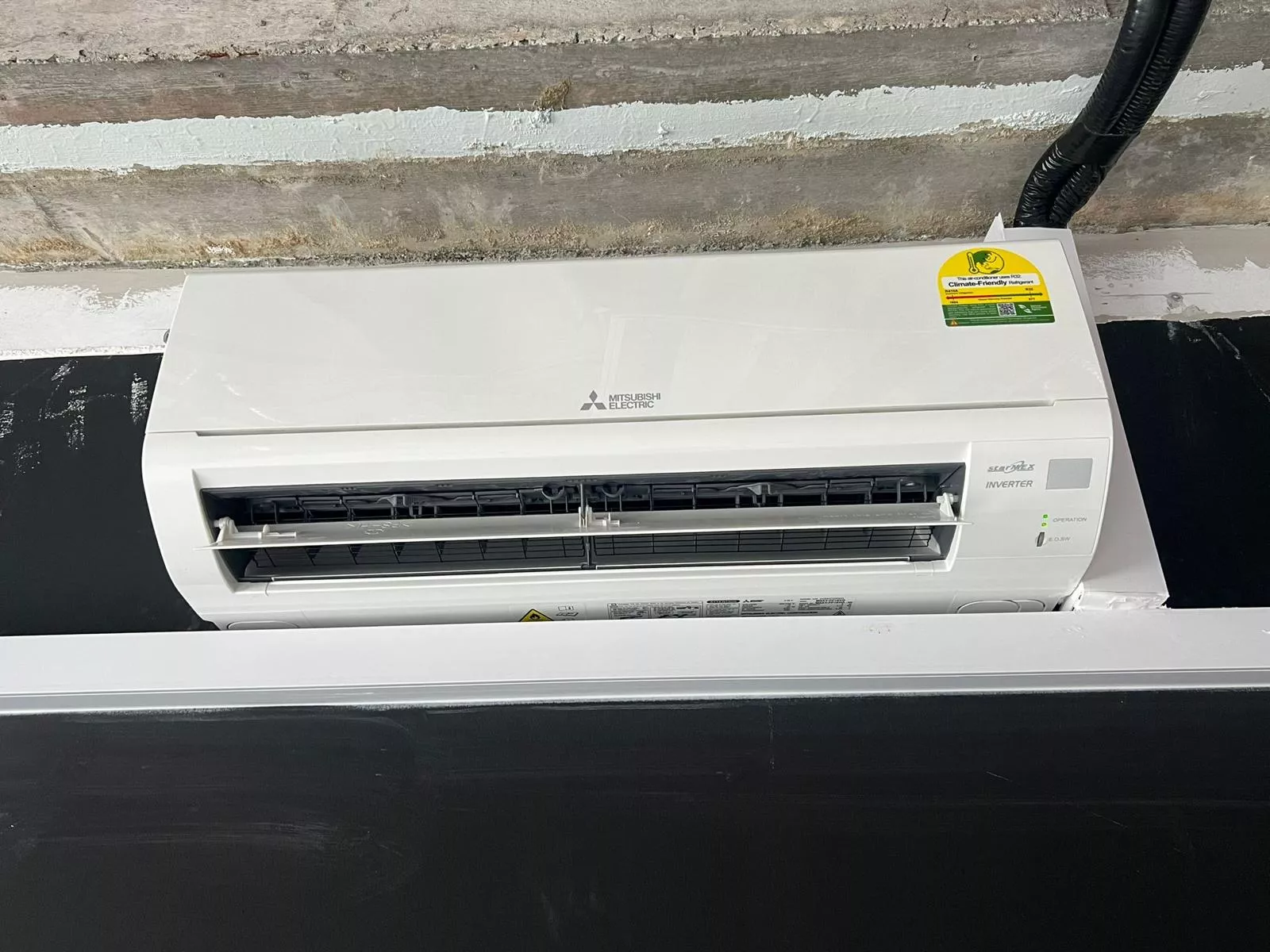
Look at the front of the indoor unit for a small window, often a grey or dark square near one end, close to the indicator lights. In the photo at the top of this post, it is the small square at the right of the front panel.
- Is anything covering it? A sticker, a bit of tape left from the installation, a decoration or a curtain can all block the signal.
- Is the unit in direct strong light? Bright sunlight or a strong lamp shining on the window can swamp the signal on some models.
- Are you pointing at the unit? Remotes work best when pointed at the receiver, within a normal room distance, with nothing between.
- Is it the right unit? In a flat with two or more indoor units, such as two bedrooms or a living room and a study, check that you are holding the remote for that unit. Remotes from different units often look identical, and a remote swapped between rooms can seem broken.
Do not take the front cover off to look at the receiver. Nothing inside it is for you to adjust.
Step 4: does the unit respond without the remote?
Many units have a small manual or emergency switch near the indicator lights, usually behind or beside the front panel. The label and position vary by brand and model, so check the booklet that came with the unit or the model's page on the maker's website rather than guess. Pressing it normally starts the unit in a default mode.
This one test splits the problem cleanly:
- The unit starts with the manual switch, but not with the remote: the unit and its board are working. The fault is the remote, the batteries, the lack of a clear line to the receiver, or the receiver itself.
- The unit does not start with the manual switch either, and no light comes on: the problem is not the remote. Check that the unit has power (the isolator, the wall switch, the circuit breaker) and then see the next section.
- The unit starts but shuts off again quickly, or the lights blink in a pattern: that is a different fault. Our post on blinking lights and error codes explains what to note for a technician.
When it is not the remote
If the batteries are new, the remote sends, the window is clear, and the unit still does nothing, the likely causes are on the unit side: a power problem, a receiver that has failed, or a control board that has stopped responding. A tripped breaker is the first thing to rule out. If the unit has power but is dead, our post on checks before you call when an aircon will not turn on sets out what to look at, and the post on PCB board replacement explains what to ask before you approve a quote. A board is a bigger job than a remote, and "the board is gone" is a diagnosis you should ask to be shown.
What not to do
- Do not buy a replacement remote before you know the unit works. If the board is at fault, a new remote changes nothing.
- Do not buy a universal remote without checking that it supports your unit's brand and model. Some need a code entered before they work, and some features may not carry over.
- Do not open the unit, or try to reset the board by switching the breaker on and off repeatedly. One switch-off for a minute is a reasonable reset. Doing it over and over is not.
- Do not pour or spray anything into the unit. Liquid on a control board turns a cheap problem into an expensive one.
What a technician checks for you
On our published job list, every service booking starts with the 9-point pre-check. Its first point is a power and thermostat test, which confirms the electrical supply, the board's response and the remote and thermostat function before any disassembly. That is the same chain of checks described above, done by someone who can test each link. The pre-check page lists all nine points.
If the pre-check finds a board fault, the repair page lists compressor and PCB replacement as quoted on site, with no published figure. Ask to see what was found and why it has to be replaced.
What the published prices are
For reference, these are the prices on the pricing page.
- Normal servicing, wall unit: $55 for 1 unit, $90 for 2, $120 for 3, $160 for 4, and $35 per unit from 5. The $55 minimum for 1 unit covers the visit, the 9-point pre-check and standard servicing.
- Standard repair for drainage or electrical faults: $80.
- Compressor or PCB replacement: quoted on site.
The pricing page does not list a price for a replacement remote, so we do not quote one here. See the aircon repair page for what a repair visit involves.
Before you message us
It helps to have these ready, because they let us tell you what a visit would cover:
- The brand of the unit, and whether the remote is original.
- Whether new batteries made any difference.
- Whether the unit starts with the manual switch.
- Whether any lights come on or blink, and in what pattern.
- When the unit was last serviced.
If you would like us to look at it
Tell us what the unit does when you press the remote and what happens with the manual switch. A short video of the indicator lights is more useful than a description. WhatsApp us on 9107 2601 and we will tell you what a visit would cover before we come.